Best Estimating Software for Construction Takeoffs
How AI takeoff software like Kamai reads blueprints, extracts quantities, and speeds up bidding - and what to look for when you choose a tool.

A bid lives or dies on the takeoff. Get the wall count wrong, miss an addendum that moved a column line, double-count a demising wall shared between two units, and the number you submit is already off before anyone touches pricing. Most estimating tools still leave that work to you: trace the line, click the corner, log the count, repeat across every sheet in the set. This post is about what changes when the software reads the drawings instead, and what to check before you commit to one.
What construction takeoff software actually does
Takeoff software pulls quantities off the drawings - the lineal feet, square footage, counts, and volumes that feed your estimate. In practice that means areas for floors and roofs, lineal measurements for walls and footings, counts for doors, windows, and fixtures, and material volumes for concrete, steel, and drywall. Those numbers are the input to everything downstream: the cost estimate, the procurement list, the schedule. A bad takeoff propagates. A missed quantity becomes a material shortage on site, and an over-count becomes a bid you lose to someone who read the plans more carefully.
Where older on-screen takeoff tools stall
The first generation of digital takeoff replaced the scale ruler and highlighter with on-screen measurement, which was a real improvement. But it kept the estimator in the loop for every single quantity. You set the scale, trace each element, click through the openings, and re-verify when the calculation looks off. On a multi-trade commercial set with architectural, structural, and MEP sheets, that is hours of clicking before pricing even starts.
Two problems follow from that. The first is throughput: a team can only trace so many sheets in a day, which caps how many bids you can put out. The second is error - manual tracing is where the wrong scale setting, the skipped sheet, and the fat-fingered count come from, and those mistakes are hard to spot once they're buried in a quantity sheet.
What AI changes
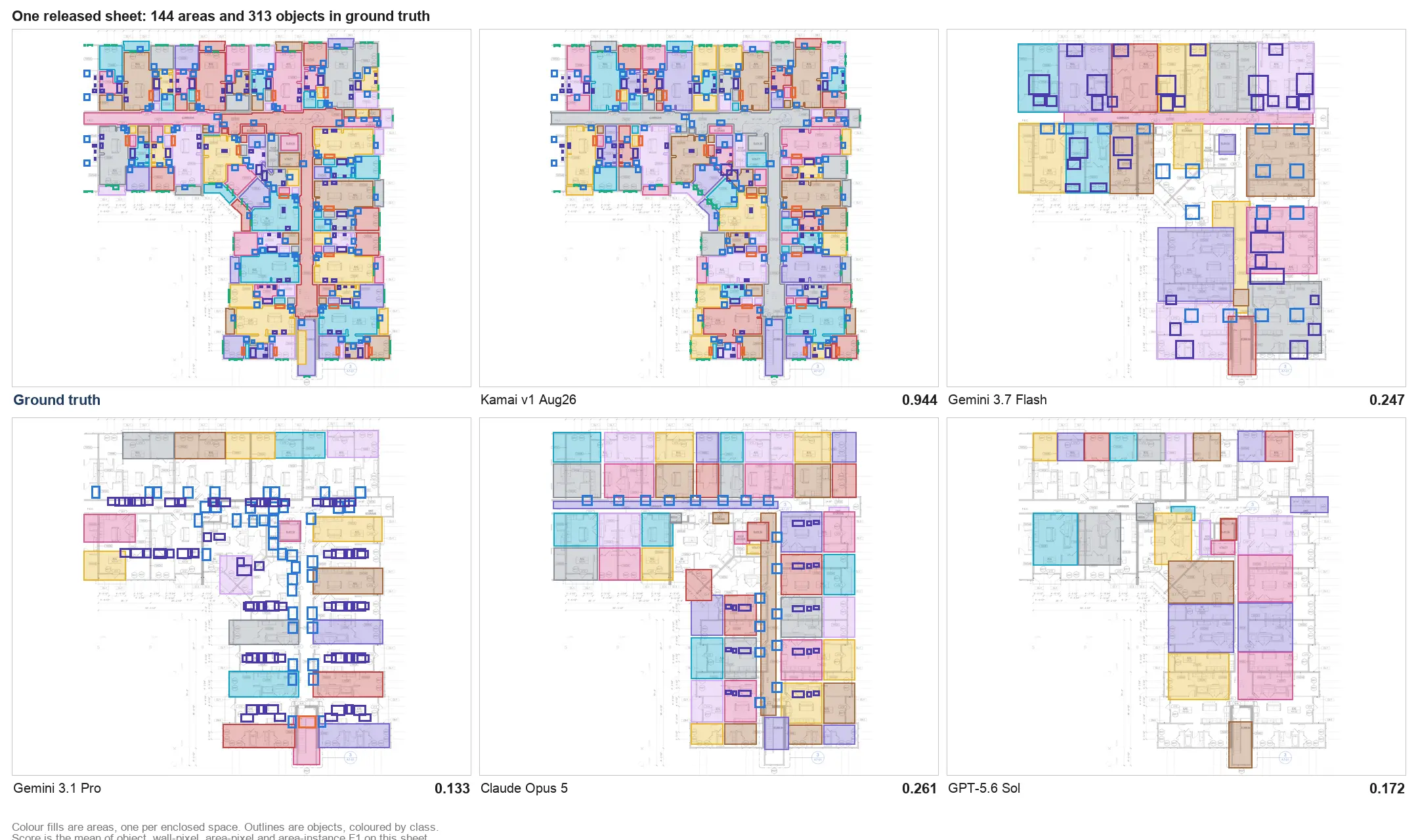
The shift is from a tool that measures what you point at to one that reads the set on its own. Kamai uses computer vision to detect walls, rooms, openings, and MEP elements across the drawings, and Kamai's models work out how those elements relate before turning them into quantities. You're not tracing each item; you're reviewing extracted output.
That moves the estimator's time to where it's worth more: checking scope, pricing, and deciding which jobs to chase, instead of logging lineal feet by hand.
How Kamai runs a takeoff
Upload a set and Kamai processes the drawings and returns quantities - areas, volumes, counts, and lineal measurements - in minutes rather than over the course of a day. There's no manual tracing step.
Those results come back as structured data, not a flat report you have to re-key. That matters for two reasons. It plugs into your estimating system and report templates without retyping, and it keeps the output consistent from project to project and from one estimator to the next, so two people taking off the same building land on the same numbers. Structured JSON output also means the quantities are queryable, not locked in a PDF.
You can pull results into Excel and PDF for the formats your bid process already runs on, and the app's AI assistant lets you ask questions about the takeoff - scope, counts, what's on a given sheet - without digging back through the drawings yourself.
Speed, and what it's actually for
A large commercial takeoff that runs hours or days by hand comes back in a fraction of that time here. The point isn't speed for its own sake. A shorter turnaround means you can answer a bid invitation the day it lands, put out more proposals in the same week, and take on jobs you'd have passed on for lack of estimating hours - without hiring to do it.
Accuracy and consistency
Manual takeoff accuracy depends on which estimator did it and how tired they were on sheet forty. Kamai standardizes the read: every measurement comes from the same process, so the count is consistent and traceable rather than a judgment call that varies by person. Fewer missed items and fewer wrong quantities means the number you submit holds up, and you're less likely to discover a gap once the job is underway.
Shared data instead of scattered files
A commercial job pulls in estimators, project managers, contractors, and the owner, and they all need to be looking at the same quantities. Kamai keeps the takeoff data in one place - organized, accessible, and current - so the team reviews and shares from a single source instead of emailing around a folder of spreadsheets that drift out of sync. When everyone references the same data, the misalignment errors mostly go away.
Handling more work without more headcount
Bigger jobs and higher bid volume usually mean hiring more estimators. Because Kamai automates the tracing, a team can run several projects at once and keep the quantities accurate without adding people. In a market where the contractor who responds fast and accurate wins, that capacity is the difference between bidding the job and watching it go.
From quantities to decisions
Older tools stop at measurement. Structured output lets you do more than tally - you can read project scope, flag risk, and make calls earlier in the process, while there's still time to act on them. That's the real gap between a measuring tool and software you estimate with.
What to look for when you choose
If you're evaluating takeoff software, weigh it against how it handles a real set: does it read architectural, structural, and MEP sheets, or just clean floor plans? Does the output come back as structured data you can move into your estimating system, or as a report you re-key? Can you get results into the formats your bid process already uses, like Excel and PDF? And does it actually cut the tracing work, or just dress up the same manual clicks?
Kamai is built for that test - it reads the drawings, returns structured quantities you can export and integrate, and gives you an AI assistant in the app to interrogate the takeoff. For estimators spending their days tracing walls, that's where the hours come back.
Get the next post in your inbox.
Low frequency. High signal.